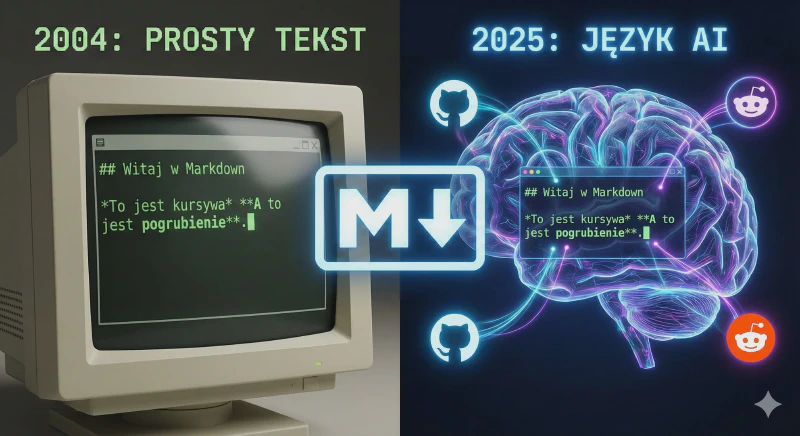
Markdown — The Perfect Format?
Markdown — what is it?
Markdown is a type of text file with the .md extension. I’d describe it as a lightweight format with a rich interior.
You can create it in any text editor — even Windows Notepad — and save it with the .md extension.
What makes Markdown better than a plain .txt file is the ability to format text. And here its perfection-through-simplicity shines, because you don’t need specialized programs like Microsoft Word or WordPad to format it. Markdown lets you do everything with text alone. For example: want a heading? Precede the text with a # hash; second-level heading — two hashes, and so on. Bold — put ** before and after the text you want to bold. Italic — one asterisk. Quote — >. Horizontal rule — ---. You can also quickly insert links and images, and — more importantly for developers — Markdown supports inserting code, either in blocks or inline.
Why use Markdown?
Besides the easy formatting of .md files, this format is also easily parsed into HTML, and modern converters handle converting Markdown to PDF or DOCX without trouble. Thanks to its simplicity and visible markup, writing documents is faster and they look cleaner and tidier. The ease of parsing also means you can publish such a document online effortlessly. This post, for example, was also written in Markdown.
Where is Markdown most commonly used?
I first encountered this file format on GitHub, where it’s used for writing program documentation. Later I discovered that content management systems for websites also accept Markdown, there are tools that let you write an entire website’s content in Markdown, GitHub makes it easy to turn such files into a webpage, and AI also understands Markdown better. I personally use Markdown for creating digital notes.
The unintended potential of Markdown when working with AI
Thanks to its simple structure, explicit formatting, clearly visible sections, and absence of exotic fonts, the Markdown format has found a perfect application in passing data to AI chats.
Compare for yourself which of the following texts is easier to read:
I'm going to Valencia for 5 days. I have a laptop, I work remotely, I travel with a dog.
I want to see the city but I don't want to rush. Suggest a daily plan,
places worth visiting and practical tips. Take into account the weather, transport and remote work.
Return the data in table form.
# Goal
Prepare a relaxed 5-day trip plan to Valencia.

## Context
- trip: solo
- dog: yes
- work: remote (laptop)

## Travel style
- no rush
- max. 4–5h of sightseeing per day
- daily block for work

## Conditions
- consider the weather
- city transport
- dog-friendly places
- good Wi-Fi

## Expected output
Return the plan in a **table**.

### Table structure
| Day | Morning | Remote work | Afternoon | Evening | Practical tips |
Although the latest AI chats should handle both prompts similarly, the difference starts to show when you want to pass a larger amount of data in the prompt and use older, cheaper AI models.
P.S. In Markdown you really do make a table by placing vertical bars:
This code:
| Area | What Markdown gives | Why it matters in practice |
|------|---------------------|---------------------------|
| Format | Plain text file `.md` | Works everywhere, no special programs needed |
| Readability | Text readable without rendering | You can read and edit in a terminal, editor, or phone |
| Structure | Headings, lists, blocks | Easier to organise thoughts and long texts |
| Portability | No lock-in | Change your tool, the files stay |
| AI collaboration | Clear content hierarchy | AI understands context and expected structure better |
| Blogging | Natural format for static sites | Ideal for Hugo, Jekyll, Astro |
| Offline | No cloud dependency | Take notes anywhere, even without internet |
| Longevity | Minimal standard | In 10–20 years you'll still be able to open these files |
| Simplicity | Little syntax | Focus on content, not formatting |
Produces a table like this:
| Area | What Markdown gives | Why it matters in practice |
|---|---|---|
| Format | Plain text file .md | Works everywhere, no special programs needed |
| Readability | Text readable without rendering | You can read and edit in a terminal, editor, or phone |
| Structure | Headings, lists, blocks | Easier to organise thoughts and long texts |
| Portability | No lock-in | Change your tool, the files stay |
| AI collaboration | Clear content hierarchy | AI understands context and expected structure better |
| Blogging | Natural format for static sites | Ideal for Hugo, Jekyll, Astro |
| Offline | No cloud dependency | Take notes anywhere, even without internet |
| Longevity | Minimal standard | In 10–20 years you’ll still be able to open these files |
| Simplicity | Little syntax | Focus on content, not formatting |
And you — had you heard of Markdown before? Where and what do you use it for?
Video — AI research on Markdown
]See other articles in the same category
Join the nomAId journey
Subscribe to stay up to date.